Open-world field manual

Where Winds Meet Exploration Guide: Map & Missing Progress

A practical route for players who keep crossing the same ground: reveal the map, open travel points, scan the area, clear one category, and diagnose only the leftovers.

map unlockWind SenseOdditiesmissing progress100% route

Maintained byHeavenskiss

Pinned answer

The efficient order is map, travel, scan, category, leftovers

Do not begin with an unfiltered interactive map. Reveal the local terrain through a Wayfarer, activate the Boundary Stones you pass, and use Wind Sense while clearing one compact cluster. When progress stalls, identify the missing category first. That turns the last few points into a diagnosis instead of a second tour of the entire region.

One rule worth keeping

If the map is dark, solve access. If the map is open but the percentage is low, solve categories. If only one marker is failing, solve its layer or state.

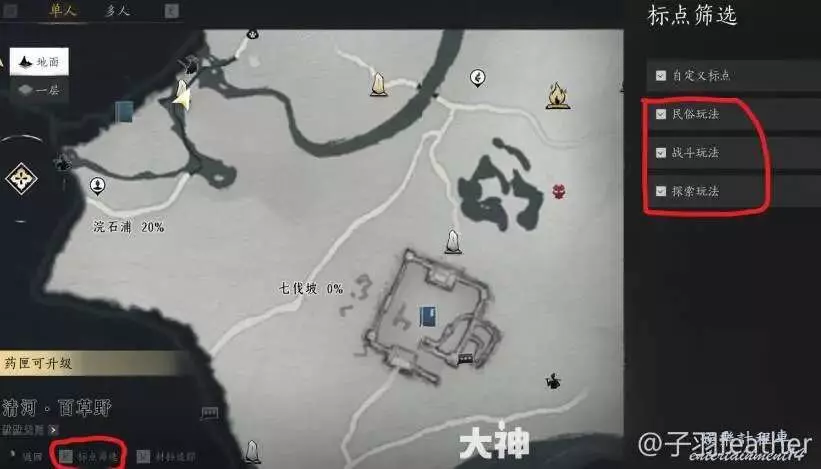
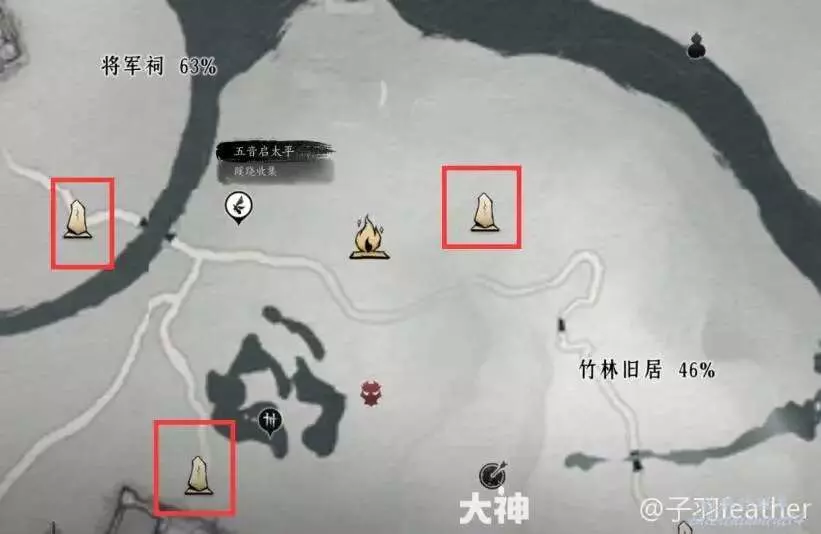
Legacy Chinese Where Winds Meet map showing map-reveal and travel markers
Legacy CN source screenshot. The marked map objects explain the reveal-versus-travel distinction; current Global labels and icons can differ.

System split

Six exploration tools, six different jobs

Most wasted time comes from asking one system to do another system's job. A Boundary Stone cannot reveal the whole map, Wind Sense is not a distant pin atlas, and an external map cannot make a story-gated activity spawn.

Wayfarer

Reveals the local terrain and removes map fog.

Not for: Fast travel or proving that every activity is currently available.

First move: Use this when the map itself is still dark.

Boundary Stone

Creates a fast-travel anchor and a useful return point.

Not for: Revealing an entire subregion or identifying the final missing collectible.

First move: Activate these during the first pass, not during cleanup.

Wind Sense

Highlights nearby clues, NPCs, chests, Oddities, tracks, and passages.

Not for: Showing every distant pin or bypassing story and quest gates.

First move: Use it inside a search area and before leaving a suspicious structure.

Regional progress

Shows which broad activity category still has unfinished work.

Not for: Giving an exact coordinate or telling you which floor a pin occupies.

First move: Read the missing category before opening an external map.

Exploration Attributes

Support specialized exploration interactions and skill requirements.

Not for: Map reveal, fast travel, or ordinary Wind Sense scanning.

First move: Check these when a special interaction prompt is unavailable.

Browser pin map

Searches exact pin types, regions, and layers during final cleanup.

Not for: Confirming that your story state can spawn or complete a pin.

First move: Filter by one missing category; do not sweep an unfiltered atlas.
Repeatable route

A 15-minute sweep that leaves the region easier than you found it

  1. 01field pass

    Reveal the subregion before collecting anything

    Find the local Wayfarer and complete the map-reveal interaction. A Boundary Stone is a travel point; activating one does not replace the Wayfarer step for dark terrain.

  2. 02field pass

    Build the travel network on the first pass

    Activate every convenient Boundary Stone you pass. It turns later quest returns and collection cleanup into short hops instead of another cross-country ride.

  3. 03field pass

    Sweep on foot with Wind Sense and the minimap

    Use Wind Sense near buildings, cliff edges, caves, camps, and dense activity clusters. Watch the minimap for nearby Oddities and interactions while moving between marked objectives.

  4. 04field pass

    Clear one category at a time

    Do not chase every icon in sight. Finish one compact cluster or one category, such as Oddities, chests, activities, or quests, then check the regional progress panel again.

  5. 05field pass

    Diagnose the leftovers instead of repeating the route

    For the last few points, check vertical layers, story state, quest prerequisites, in-game time, and region ownership. Use an external pin map only after you know which category is missing.

Pick up what is on the route; do not let one pin choose the route

Nearby Oddities and chests are cheap wins. A lone marker across the subregion is not. Finish the access network and the current cluster first, then return during a filtered cleanup pass.

Field tools

When to use Wind Sense, filters, flying, mounts, and time

ToolBest useUse it whenDo not assume
Wind SenseShort-range investigationInside a marked search area, near a cave or building, after following tracks, and before leaving a cluster.The current secondary guide places its early unlock under Develop > Talents and says it needs no skill slot. Menu wording can move after a patch.
MinimapNearby signal catcherWhile riding between objectives and while circling a compact subregion for Oddities or activity prompts.A nearby signal is not always on your floor. Check cliffs, roofs, tunnels, shorelines, and cave entrances before calling it bugged.
Map filtersCategory cleanupAfter regional progress tells you whether you are missing chests, activities, quests, Oddities, bosses, or another category.Old CN screenshots prove the filtering method, not the current English labels, icon colors, or menu arrangement.
Lightness SkillsVertical and long-distance traversalWhen the target is above you, across a gap, on a wall route, or behind a regional flying requirement.Learning a movement skill and having permission to use it in every region are separate checks.
MountRoad and open-ground travelBetween activity clusters after the nearest Boundary Stones are active.A mount is efficient on open routes but poor for final-meter searching around vertical structures.
In-game timeQuest-state troubleshootingWhen a tracked quest explicitly asks you to return later or an NPC is absent at the expected place.Changing time does not override a missing story chapter, prerequisite item, or unavailable event state.
Legacy Chinese Where Winds Meet map filter interface
The old CN source grouped map markers by activity type. Keep that method; re-check the names and icons in the current Global client.

Troubleshooting desk

Missing progress: diagnose the symptom before opening another map

What you seeCheck firstWhat to do nextOwner guide
The map is still grey or blankMap revealFind the local Wayfarer. If the route is unclear, use the map-unlock guide before chasing individual pins.Fix map access
The terrain is visible, but every return trip is slowTravel networkActivate nearby Boundary Stones and use them as the spine of each collection loop.Read travel split
A marker is here, but no prompt appearsLayer and stateCircle the area with Wind Sense, then check above, below, shoreline, cave entrance, story state, prerequisite item, and in-game time.Open blocker list
Regional progress is stuck below 100%Missing categoryOpen the region panel, identify the unfinished category, and sweep only that category. Some rows remain gated by later story access.Choose a region
The pin is close, but Wind Sense finds nothingVertical routeTreat the pin as an area marker. Look for stairs, wells, tunnels, cliff paths, water routes, roofs, or a second map layer.Find a route note
Flying or wall movement works elsewhere but not hereTraversal permissionCheck the region-specific permit, Afterglow route, or Wallstride requirement instead of relearning the same skill.Check Lightness
An animal has no special interaction promptExploration skillCheck Animal Whisperer and your Exploration Attributes. The current Game8 listing requires Mindset 75, Intelligence 50, and 600 total Exploration Attribute Points; trust the live tooltip if it differs.Read attribute panels
A quest says to return after several daysIn-game clockUse the game's time adjustment, return to the objective, and re-check the tracker. Real-world waiting is usually not the intended first test.Use time safely

A visible pin is not proof that the interaction is ready

Some points are underground, belong to another route state, or open after later story progress. External maps help locate the area; the live quest tracker, map layer, and client prompt decide whether the point is currently actionable.

Route planner

Choose a session by the result you want

15-minute first pass

Make the area usable

Route: Wayfarer -> nearest Boundary Stones -> one compact activity cluster -> stop at a travel point.

Stop rule: Leave rare cleanup for later. The win is map access and a short return route.

30-minute quest pass

Advance story and collect on the way

Route: Track one quest -> use Wind Sense inside each objective area -> collect nearby Oddities -> activate every Stone on the route.

Stop rule: Do not detour across the region for a single chest while the quest is opening new access.

45-minute cleanup

Raise regional progress

Route: Read the missing category -> filter the map -> sweep one subregion -> check progress -> log any story-gated leftovers.

Stop rule: If three pins fail for the same state reason, stop and advance the relevant story or prerequisite.

Completionist return

Resolve the final few points

Route: Compare the regional checklist with a filtered pin map -> verify layer, time, and story state -> open the focused route guide.

Stop rule: Never repeat a full unfiltered sweep until you know which category actually moved.

Evidence & FAQ

What is current, what is historical, and what the live client decides

How do I reveal a dark section of the Where Winds Meet map?

Find and speak with the local Wayfarer for that subregion. Boundary Stones are fast-travel points and should be activated too, but they are not the same system as map reveal.

What does Wind Sense do in Where Winds Meet?

Wind Sense is a short-range exploration scanner. It can highlight nearby clues, chests, NPCs, Oddities, tracks, and passages. Use it inside a search area; it is not a complete long-range map.

Why is my regional exploration progress stuck below 100%?

First identify the unfinished category in the regional progress panel. Then check vertical layers, story access, quest prerequisites, in-game time, and whether the point belongs to a neighboring subregion before repeating a full sweep.

Should I collect every chest as soon as I see it?

Collect nearby items, but do not cross the map for every isolated marker during the first story pass. Reveal the map and activate travel points first; the resulting network makes later cleanup much faster.

Do I need an external interactive map?

Not for normal discovery. The in-game map, minimap, Wind Sense, and regional progress panel handle most exploration. An external map is most useful for a known missing category or exact final pin.

Can changing the in-game time unlock a missing activity?

It can advance quests that explicitly ask you to return later or restore an expected NPC schedule. It cannot replace a missing story chapter, prerequisite item, region unlock, or live-event state.

vertical layers checked separatelyregion access can be story-gatedlive client wins after patches